


Managing prescription benefits is rarely difficult because of one dramatic problem. It is difficult because several small tasks have to line up: checking coverage, finding the right pharmacy, understanding a refill, and knowing what to do when something changes. I found that OptumRx is designed for that exact chain of decisions. It is a free medical app from Optum Inc. that puts pharmacy-benefit information into a mobile workflow instead of leaving you to search through paperwork or make repeated calls.
My overall impression is practical rather than flashy. This is not an app I would open for general health advice, symptom checking, or medication education across every possible pharmacy. Its value is narrower and more useful: it gives people who use OptumRx pharmacy benefits a central place to manage prescription-related tasks. If that describes your situation, it can save time and make routine decisions easier. If you do not have an OptumRx benefit connection, the app is unlikely to offer much reason to stay installed.
From a prescription question to a completed pharmacy task
The starting condition: a benefit decision, not a medical diagnosis
The best way to understand this app is to begin with the problem it solves. Imagine that I have a prescription approaching its refill point and I want to know what happens next. I may need to check whether the medication is covered, identify a suitable pharmacy, review the status of an order, or understand why the expected cost is different from the last time. These are pharmacy-benefit questions, not questions about whether the medicine is medically appropriate.
That distinction matters. OptumRx does not replace a doctor, pharmacist, urgent-care service, or emergency resource. I would not use it to decide whether to start, stop, or change a medicine. Instead, I use it after a clinician has prescribed treatment and I need to navigate the practical side of obtaining it. Keeping that boundary clear prevents one of the most common mistakes with health apps: expecting an administrative tool to provide clinical judgment.
The app sits in the medical category, but its day-to-day role feels closer to a benefits dashboard. Its store summary describes it as a way to become an advocate for your pharmacy benefits, and that is a fair description when interpreted practically. The app gives me information and actions that help me ask better questions and make more informed choices. It does not make the healthcare system simple, but it can make my part of the process more organized.
Getting oriented before taking action
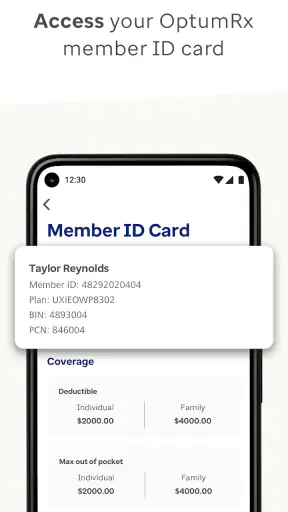
When I approach an app like this, I first want to know whether it is connected to the benefit information that actually applies to me. That is more important than the visual design. A polished interface is not useful if the account, plan, or prescription details are not relevant to my coverage. I would therefore begin by signing in carefully and checking that the displayed benefit context matches the plan I expect to use.
This is also where I would keep my personal information accurate and avoid rushing through a task simply because the screen makes it look quick. Pharmacy transactions involve names, prescriptions, addresses, and coverage details. A small mismatch can create a handoff problem later, especially when another person, such as a pharmacist or prescriber, has to act on the information.
One useful habit is to open the app before I am standing at the pharmacy counter. That gives me time to read the available information, compare the options presented, and note anything that needs clarification. Using it in advance turns the app from a last-second rescue tool into a planning tool. I can arrive knowing what I want to ask instead of trying to interpret benefit details while other customers are waiting.
Following the prescription workflow step by step
Once I have a specific prescription task in mind, I work through the relevant information in order. I start with the medication or order details, then look at the coverage or pharmacy information connected to that task, and only afterward decide whether I need to contact someone. This sequence is important because it separates facts already available in the account from questions that require a human answer.
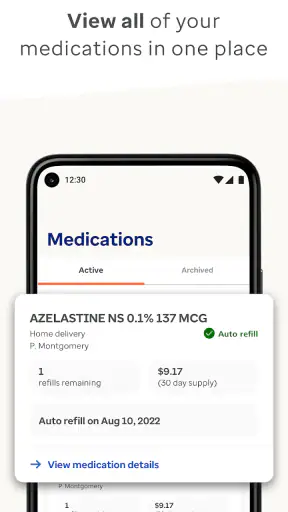
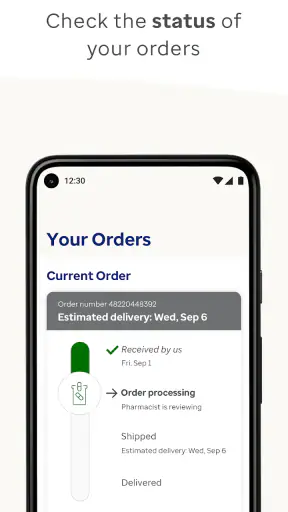
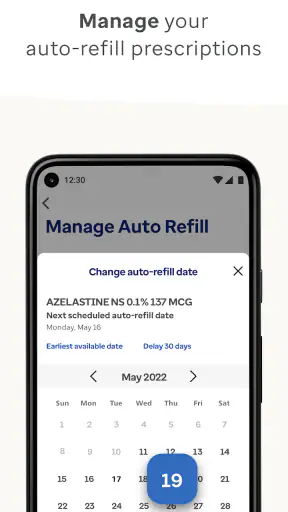
For example, if I am trying to arrange a refill, I would first review the prescription information and its current status rather than immediately calling the pharmacy. If the status answers my question, I have avoided an unnecessary call. If it shows a delay or a problem, I have a more precise starting point for the next conversation. That is one of the app's strongest practical benefits: it can reduce vague back-and-forth by giving me a shared reference point.
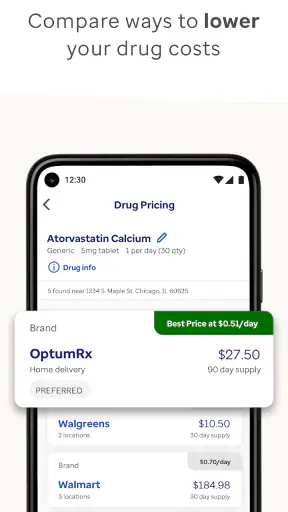
When I am comparing pharmacy choices, I would not look only at convenience. A nearby location may be the easiest option for today, while another route may fit the benefit arrangement better. The app is most useful when I treat the displayed options as part of a decision rather than automatically selecting the first one. I still need to consider opening hours, stock, travel, and whether the pharmacy can handle the prescription in the way I need.
A less obvious but valuable workflow is to use the app when a routine prescription suddenly becomes less routine. A medication may have a different status, a new cost expectation, or an issue that needs attention. Instead of assuming that the pharmacy made a mistake, I can use the account information to identify where the process appears to have changed. That does not resolve every issue, but it helps me direct the question to the right party.
Handoffs between the app, pharmacy, and prescriber
Prescription management is a chain of handoffs, and no single screen controls every link. OptumRx can help me understand the benefit side, but the pharmacy handles dispensing and the prescriber handles clinical decisions. If a prescription needs clarification, the pharmacy may need to contact the prescriber. If coverage creates a problem, the benefit administrator may be involved. The app is useful partly because it helps me see which conversation comes next.
I would use the app to prepare for those conversations, not to assume that an on-screen status is the final answer. Before contacting a pharmacy, I would note the prescription name, the issue shown in the app, and the action I am requesting. Before contacting a prescriber, I would explain the benefit or availability problem without asking the clinician to make a decision based only on an incomplete app display.
This separation also prevents misplaced frustration. If the app shows information that looks correct but the pharmacy cannot fill the prescription, the problem may involve inventory, timing, prescription instructions, or a clinical clarification. If the pharmacy says the prescription is ready but the benefit information looks different, the next step may be a coverage question rather than a complaint about the store. The app cannot eliminate these boundaries, but it can make them easier to recognize.
For caregivers, the handoff issue becomes even more important. Helping a family member with medications often means switching between the person's needs, the pharmacy's process, and the benefit account. I would avoid treating the app as permission to make every decision on someone else's behalf. Instead, I would use it to organize information and confirm what needs to be discussed with the account holder, pharmacist, or clinician.
What a successful result looks like
The result I want from OptumRx is not simply a completed tap. It is confidence that I understand the next step. A successful session might mean I know where a prescription stands, have identified the pharmacy question that needs answering, or have enough benefit information to choose between practical options. That kind of outcome is modest, but it is exactly where a focused app can be helpful.
In an everyday scenario, I might receive a reminder that a regular medication is due soon. Rather than waiting until I have run out, I open the app, review the prescription information, and check the available route for obtaining it. If everything looks normal, I can continue with less uncertainty. If something has changed, I have discovered it early enough to contact the pharmacy or prescriber without turning the situation into an urgent interruption.
Another useful scenario is preparing for travel. I would not rely on the app alone to solve every timing or supply issue, but I could use it to review my prescription situation before leaving. That gives me a chance to spot a refill concern and ask the appropriate human contact while I still have time. The real advantage is planning ahead; the app is less helpful when I wait until the last dose and expect an instant solution.
The app has reached over one million installs and holds a 4.3 average from around fifty-five thousand ratings, with roughly eight thousand reviews. Those figures suggest that it is not a niche experiment, but they do not guarantee that every person's experience will be smooth. Pharmacy benefits vary, and the usefulness of the app depends heavily on the relationship between the user's plan and the task being attempted.
Where the flow breaks and how to respond
The main weakness is that a digital view of a prescription is not the same as control over the entire prescription process. A status can be informative without explaining every reason behind it. A pharmacy choice can look convenient without guaranteeing immediate availability. A benefit detail can guide a question without replacing a pharmacist's explanation. I appreciate the app more when I treat it as a source of orientation rather than an all-purpose problem solver.
There is also a learning curve in knowing which information matters. A first-time user may see several pharmacy-benefit details and still wonder which one affects the immediate task. My advice is to define the goal before opening the app: am I checking coverage, preparing a refill, reviewing an order, or finding the next person to contact? A clear goal makes the interface easier to use and reduces aimless browsing.
Another point of friction is the difference between convenience and certainty. I may prefer to complete everything from my phone, but some situations still require a phone call or an in-person conversation. If a prescription is clinically unclear, delayed for a reason that needs explanation, or affected by information the app does not resolve, I should move to the pharmacist or prescriber rather than repeatedly refreshing the screen.
People who want a broad medication reference, symptom tracker, drug-interaction guide, or telehealth service should look elsewhere. OptumRx is not the right choice simply because it belongs to the medical category. Its focus is pharmacy benefits and prescription management. That narrow scope is a strength for eligible users, but a limitation for anyone seeking a complete personal health record or a general wellness companion.
Comparing it with the usual alternatives
The usual alternative is to manage everything through a pharmacy website, separate pharmacy app, paper benefit card, and telephone support. That approach can work, especially for people who use one local pharmacy and rarely need to compare options. The advantage of OptumRx is that it brings the benefit side into a dedicated mobile experience, which can make it easier to review information before contacting another service.
A pharmacy's own app may be better for store-specific tasks, such as local pickup details or communication with that pharmacy. OptumRx is more relevant when the question is tied to the benefit arrangement rather than just the store. In practice, I would not expect one app to replace the other. The most efficient setup may involve using OptumRx to understand the benefit context and the pharmacy's system to handle location-specific fulfillment.
Telephone support remains the better option when the situation is complicated, urgent, or difficult to interpret. A person can ask follow-up questions and notice details that a fixed screen cannot. The trade-off is waiting and explaining the situation from the beginning. I see the app as a way to make that call more productive, not necessarily as a reason never to call.
Who should use it and who should skip it
I would recommend OptumRx to people whose pharmacy benefits are managed through OptumRx and who regularly handle refills, coverage questions, pharmacy choices, or prescription status checks. It is especially useful for anyone who prefers to review information privately before speaking with a pharmacist or support representative. It can also help organized caregivers who need a central place to prepare for medication-related conversations.
I would skip it if I do not use an OptumRx benefit arrangement or if my needs are primarily clinical rather than administrative. I would also avoid depending on it as the only resource for an urgent medication problem. In those situations, the pharmacist, prescribing clinician, or appropriate urgent service should take priority.
The app is free, rated for Everyone, and its current version is 4.57.1 with a minimum operating-system requirement of 11. It was released on January 28, 2015, so it has had time to develop beyond the idea of a simple benefit card on a phone. Even so, a long-running app can still feel less intuitive when a user's plan or prescription situation is complicated. I would install it with realistic expectations: useful for navigation and preparation, not a replacement for professional care.
My recommendation after using the complete workflow
OptumRx earns my recommendation for the specific job it is built to handle. I like that it encourages me to check the benefit side before making a pharmacy call, prepare better questions, and notice potential refill problems earlier. The most valuable habit is using it before a prescription becomes urgent. That is when the information has the most practical value and the handoffs are easiest to manage.
My reservation is equally clear: the app cannot make every handoff disappear. Some problems still belong to the pharmacy, prescriber, or support team, and a user who expects one-tap resolution may become frustrated. Used as a focused companion for pharmacy benefits, however, it gives me a more orderly path from a prescription question to a sensible next action.
My final view: install OptumRx if it matches your pharmacy benefit and you want a clearer way to prepare, monitor, and follow up on prescription tasks. It is not a universal health app, but for the right user it can turn a scattered process into a manageable workflow, with enough information to know what to do next and when a human professional needs to take over.


